Make A Payment
All CareSource Marketplace members have a monthly premium payment.
Topics:
What is a premium?
What is the Advance Premium Tax Credit (APTC)?
When are invoices mailed?
What is the Grace Period?
How can I pay my monthly premium?
What does my invoice look like?
What is a premium?
A premium is the amount of money you pay each month to have health care coverage.
If you are new to CareSource your premium must be paid in full to start your coverage. You can make your first payment when you enroll or wait for your bill, or invoice, to come in the mail. You may have or be able to have your premium lowered by applying APTC (Advanced Premium Tax Credit) toward your monthly premium amount.
What is the Advance Premium Tax Credit (APTC)?
APTC is a tax credit/financial help from the government that lowers monthly payment amounts. This credit can be used no matter which Marketplace plan you enroll in! The government decides if you qualify based on your household size and estimated income which can be up to 400% of the federal poverty guideline.* Check your eligibility at Low Cost Marketplace Health Care, Qualifying Income Levels | HealthCare.gov.
Reporting Changes
Eligibility for the tax credit can change throughout the year. Report changes in family size or household income to the Marketplace or your state exchange ASAP to be sure you get the right tax credit. Changes that should be reported:
- Increases or decreases in your household income.
- Events that could result in a major increase to household income include:
- Lump sum payments of Social Security benefits, including Social Security Disability Insurance.
- Lump sum taxable distributions from an individual retirement account (IRA) or other retirement arrangement.
- Debt forgiveness or cancellation, such as the cancellation of credit card debt.
- Events that could result in a major increase to household income include:
- Marriage
- Divorce
- Birth or adoption of a child
- Other changes to your household make up
- Gaining or losing eligibility for government sponsored or employer sponsored health care coverage.
- Moving to another address
Why reporting changes matters
- If you receive more APTC than you qualify for based on your final annual income, you will have to pay back the excess when you file your federal tax return. This could reduce your refund or increase your tax bill.
- If you have taken less than you qualify for, you may get a credit or a refund for the difference when you file your federal tax return.
Need more information? Contact Member Services: 1-833-230-2099 (TTY: 711).
* The federal poverty guideline can be changed yearly by the Department of Health and Human Services.
What does my invoice look like?
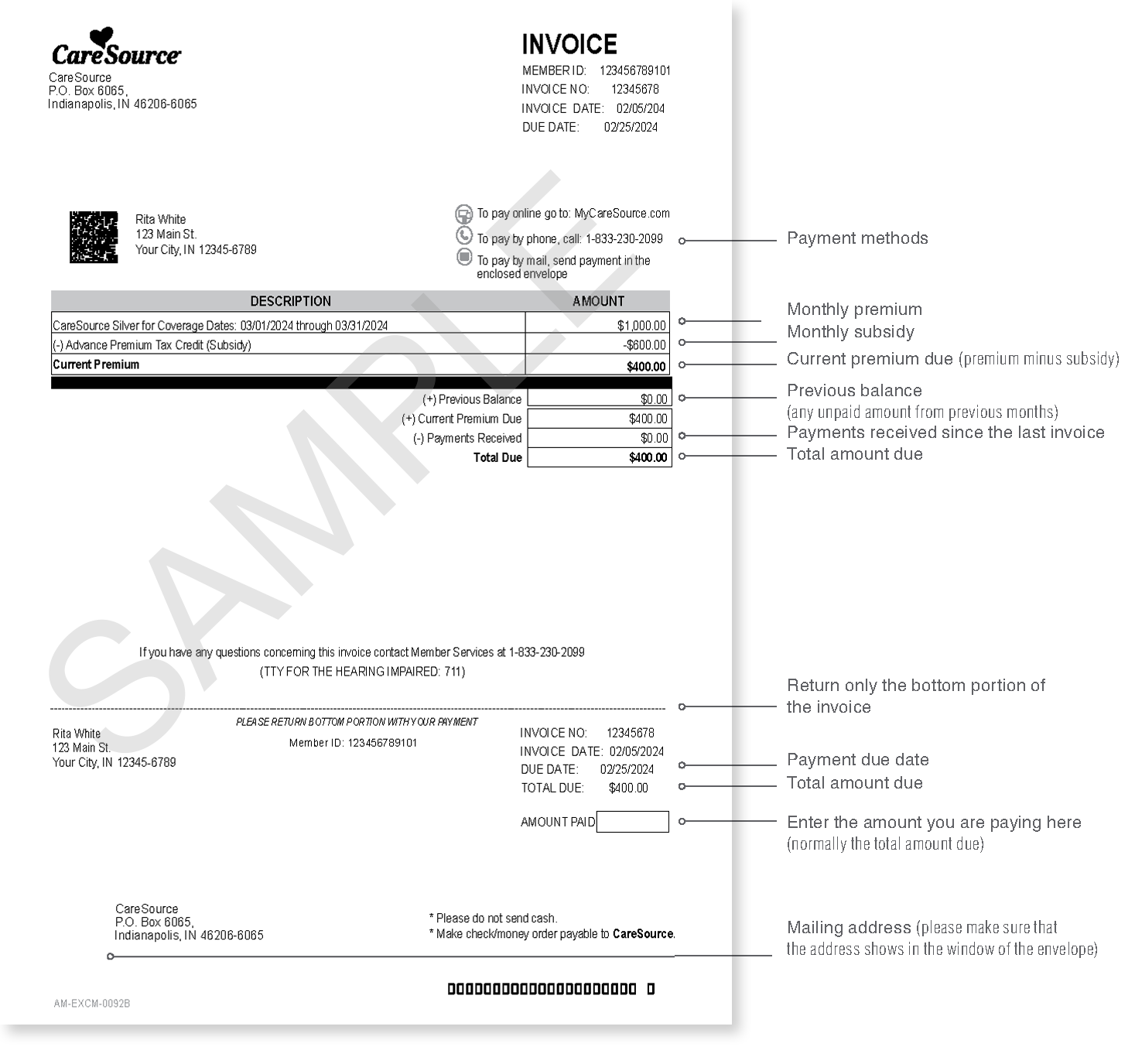
When are invoices mailed?
We mail invoices at the start of the month for the coming month. You’ll get your January invoice in early December, or soon after you enroll.
You can choose to get your invoices electronically. We will email or text you each month when your invoice is ready to view in your My CareSource member portal account.
- It is important to pay the total amount due by the due date on your invoice! If we do not get your payment by the due date, your account is considered past due. This means your benefits are at risk and your providers may ask for payment at the time of service.
What is the Grace Period?
If you get Advance Premium Tax Credit (APTC) to lower your payment, your grace period will be three months after your missed payment.
During the grace period we will:
- Hold claims for covered services during the second and third months of the grace period. We may choose to pay these while reserving the right to get back any amounts paid during this period.
- Reject prescription drug claims during the second and third months of grace period. You are responsible for full cost of prescriptions filled during this time.
- Tell providers that denied claims are possible during the second and third months of the grace period.
If you do not get APTC, or you purchased your policy directly from us (off the exchange), your grace period will be thirty-one (31) calendar days after your payment due date.
During your grace period we will:
- Hold claims for covered services during the grace period or reserve the right to get back any amounts we may pay during this period,
- Reject prescription drug claims during the grace period.
- Tell providers that denied claims are possible during the grace period.
If you have had a financial hardship or job loss, acting now may lower your payment. Visit enroll.caresource.com or call us at 1-844-539-1733 (TTY: 711) to update your income information.
You can also go to Updating your household and financial information may lower your monthly payment.
How can I pay my monthly premium?
Your first payment can be made:
- When you enroll.
- Make an express payment at CareSource.com/MPpay
- No login needed! Enter your name, CareSource ID number and birth date to go straight to the payment page.
- Pay by phone:
- Call 1-833-230-2099 and tell our automated attendant that you would like to make a payment. Our Member Services representatives cannot take your payment by phone. They will transfer you to the pay by phone automated attendant.
- Phone payments can be made with credit card, debit card or e-check.
- Pay by mail:
- Remove the bottom part of your invoice and write in the amount of your check or money order.
- Put the bottom part (remittance slip) of your invoice and your check or money order in the enclosed envelope.
- Make sure that our address shows through the window of the envelope.
- Please put your member ID number on the memo line of the check or money order
Once your plan is active, you can also pay through your secure My CareSource portal account.
- Set up or update your My CareSource® account.
- Log into your My CareSource® account and select Pay Bill from the My Help menu.
- You can choose Make a Payment for a one-time payment or Manage Automatic Payments to set up automatic monthly payments.
- Either choice will take you to our secure, online payment portal.
- Enter your information to make your payment or set up automatic monthly payments.
- Make an express payment at CareSource.com/MPpay
- No login needed! Enter your name, CareSource ID number and birth date to go straight to the payment page.
Payments can be made with credit card, debit card, or e-check. CareSource also offers the convenience for you to pay using Google Pay or Apple Pay!
You can see when your last payment was posted by clicking Account at the top of your MyCareSource.com account screen. This will show your total amount due.
Click View Account Activity on the right side of the screen to see each payment and when it was received. You can also view and print invoices or request a printed copy of an invoice.