Make A Payment
Every payment takes time to process and is due before the month of coverage. That’s why it’s important to pay the total balance by the due date.
Premium is Due by the 25th of Each Month Prior to Coverage
You need to pay before the month of coverage begins. For example, payment for June coverage is due on May 25.
Easy Ways to Pay Your Monthly Premium
All payment options are available to all members, no matter how you purchased your health plan.
ELECTRONIC PAYMENT
CareSource MyLifeSM at MyLife.CareSource.com.
- Make a one-time premium payment -OR-
- Save time and stress less when you set up AutoPay! It’s the easy way to automatically pay your premium. Here’s how to set it up:
- Log into CareSource MyLife and click on “My Plan” (in the bottom bar).
- Click “Payments” (in the top bar) then “Sign up for AutoPay” and “Continue.”
- Tap the icon (top left corner) then select “AutoPay” and enter the required information. We accept credit cards, debit cards, bank account transfer, Apple Pay® or Google Pay®.
Self-Service Pay by Phone
Call 1-833-230-2099 (TTY: 711)
Pay your premium by phone using our self-service interactive voice response system. It’s available 24/7. You may pay using your credit card, bank card, or checking account. Paying by phone is for one-time payments only. Recurring payments cannot be set up.
Pay Online at CareSource.com/MPpay
No login needed. No extra cost! Enter your member information and go directly to the payment screen. You can make a one-time payment using the link. It’s easy and secure.
CHECK PAYMENT BY MAIL
CareSource
P.O. Box 630568
Cincinnati, OH 45263-0568
Instructions:
Mail a personal or cashier’s check or money order, made payable to CareSource, with the remittance stub from the bottom of your invoice to the address listed above. Do not include claims or correspondence with your payment. Doing so will delay payment processing.
On your remittance stub – Only write the amount paid.
On your check or money order – Write your 9-digit member ID number.
- This will make sure your payment is applied to your account.
- Do not write “Paid in full” on the check. Doing so will cause a delay.
More Topics:
What is a premium?
What is the Advance Premium Tax Credit (APTC)?
What does my invoice look like?
When are invoices mailed?
What is the Grace Period?
What is a premium?
A premium is the amount of money you pay each month to have health care coverage.
If you are new to CareSource your premium must be paid in full to start your coverage. You can make your first payment when you enroll or wait for your invoice to come in the mail. You may have or be able to have your premium lowered by applying APTC (Advance Premium Tax Credit) toward your monthly premium amount.
What is the Advance Premium Tax Credit (APTC)?
APTC is a tax credit/financial help from the government that lowers monthly payment amounts. This credit can be used no matter which Marketplace plan you enroll in! The government decides if you qualify based on your household size and estimated income, which can be up to 400% of the federal poverty guideline.* Check your eligibility at Low Cost Marketplace Health Care, Qualifying Income Levels | HealthCare.gov.
Reporting Changes
Eligibility for the tax credit can change throughout the year. Report changes in family size or household income to the Marketplace or your state exchange ASAP to be sure you get the right tax credit. Changes that should be reported:
- Increases or decreases in your household income. Events that could result in a major increase to household income include:
- Lump sum payments of Social Security benefits, including Social Security Disability Insurance.
- Lump sum taxable distributions from an individual retirement account (IRA) or other retirement arrangement.
- Debt forgiveness or cancellation, such as the cancellation of credit card debt.
- Marriage or divorce
- Birth or adoption of a child
- Other changes to your household make up
- Gaining or losing eligibility for government sponsored or employer sponsored health care coverage.
- Moving to another address
Why reporting changes matters
- If you receive more APTC than you qualify for based on your final annual income, you will have to pay back the excess when you file your federal tax return. This could reduce your refund or increase your tax bill.
- If you have taken less than you qualify for, you may get a credit or a refund for the difference when you file your federal tax return.
Need more information? Contact Member Services: 1-833-230-2099 (TTY: 711).
* The federal poverty guideline can be changed yearly by the Department of Health and Human Services.
What does my invoice look like?
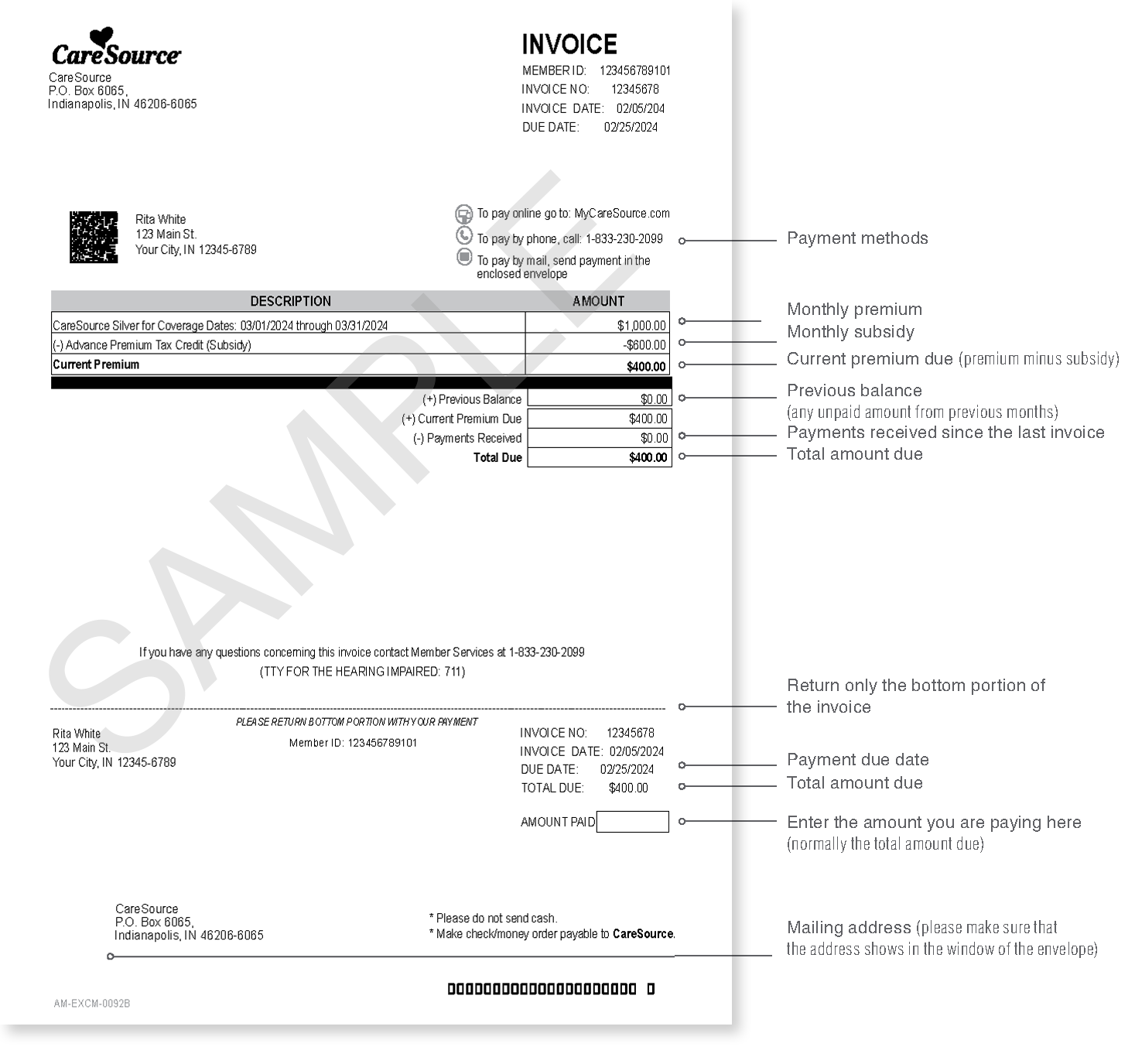
When are invoices mailed?
We mail invoices at the start of the month for the coming month. You’ll get your January invoice in early December, or soon after you enroll.
You can choose to get your invoices electronically. We will email or text you each month when your invoice is ready to view in your CareSource MyLife member account.
- It is important to pay the total amount due by the due date on your invoice! If we do not get your payment by the due date, your account is considered past due. This means your benefits are at risk and your providers may ask for payment at the time of service.
What is the Grace Period?
If you get Advance Premium Tax Credit (APTC) to lower your payment, your grace period will be three months after your missed payment.
During the grace period we will:
- Hold claims for covered services during the second and third months of the grace period. We may choose to pay these while reserving the right to get back any amounts paid during this period.
- Reject prescription drug claims during the second and third months of grace period. You are responsible for full cost of prescriptions filled during this time.
- Tell providers that denied claims are possible during the second and third months of the grace period.
If you do not get APTC, or you purchased your policy directly from us (off exchange), your grace period will be thirty-one (31) calendar days after your payment due date.
During your grace period we will:
- Hold claims for covered services during the grace period or reserve the right to get back any amounts we may pay during this period,
- Reject prescription drug claims during the grace period.
- Tell providers that denied claims are possible during the grace period.
If you have had a financial hardship or job loss, acting now may lower your payment. Visit enroll.caresource.com or call us at 1-844-539-1733 (TTY: 711) to update your income information.