Claim Rejection Notifications
What rejections are from your 277CA?
Review the various errors below to understand how to correct and resubmit.
When viewing your 277CA, all CareSource rejections will have a Claim Status Category Code of:
- A6, indicating missing information or
- A7, indicating invalid information received.
The second code is the Error Number (see the list below). You can find this after the A6 or A7 in the STC segment of your 277CA.
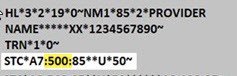
Error Number: 88
Error Description: Member is not eligible during the entire duration of the Inpatient Facility Stay
Reason for Error: The member’s eligibility termed before the discharge date.
How to Fix: Make sure all service lines are in within the member’s coverage period. Split the claim based on eligibility dates and resubmit.
Error Number: 128
Error Description: Submitted Provider Tax ID not in our Facets system.
How to Fix: The provider is not set up with us to send electronic claims. The provider needs to submit a W-9 form to us prior to submitting electronic claims.
Please contact Provider Services at 1-833-230-2101 for instructions.
Error Number: 142
Error Description: Entity’s license/certification number.
How to Fix: A provider’s license or certification has expired or is not in our Facets system. Update your records on the Provider Portal.
Error Number: 145
Error Description: Billing or Rendering Provider Taxonomy Code is invalid/missing or incorrect.
How to Fix: Make sure the Taxonomy Code for the billing/rendering provider is correct on the claim.
Error Number: 255
Error Description: Rejection for Missing Diagnosis Code
How to Fix: Review member’s medical record for diagnosis codes relevant to the services billed. If one or more additional diagnosis is identified that were not present on the claim submission, add the corresponding code(s) to the claim record and resubmit.
Error Number: 453
Error Description: Procedure code/mod combo not valid
How to Fix: Resubmit with a valid Procedure Code and/or Modifier. For your convenience, visit our Procedure Lookup Tool.
Error Number: 538
Error Description: Corrected claim, with no original claim ID
How to Fix: If you are sending a corrected claim with frequency of 7, you must include the last adjudicated Claim ID in the REF*F8 segment. If the last adjudicated claim ID is unknown, contact Provider Services at 1-833-230-2101.
Error Number: 562
Error Description: One or more of the submitted Provider NPI’s are not in our Facets system.
How to Fix: The provider is not set up with us to send electronic claims. The provider needs to submit a W-9 form to us prior to submitting electronic claims. Please contact Provider Services at 1-833-230-2101 for more information.
Error Number: 632
Error Description: Sanctioned due to CMS/OIG Preclusion
How to Fix: The provider is on the list of sanctioned providers that CMS/OIG have determined and we cannot process claims for these providers.
Error Number: 766
Error Description: Services were performed during a Health Insurance Exchange (HIX) premium payment grace period.
How to Fix: This is not a rejection. HIX premiums are to be paid by the member each month. If payment is not received, we will hold the claim for the length of the grace period and then pay the claim if the premium is received.
Error Number: 773
Error Description: Claim is rejected for service line date spans more than a calendar year.
How to Fix: Make sure all service lines are in the same calendar year. Split the claim based on the calendar year and resubmit.